
TikTok analytics and drafting for creators

Find the TikToks
that break out

Paroot measures which of your TikTok posts outperform your own usual reach, works out the format behind them, and drafts the next one. You review every draft and publish it yourself in the TikTok app.

Connect with TikTok's official login. Paroot never posts anything without you.

How it works

Three steps, and you stay in control of the last one

Paroot reads the accounts you connect, tells you which posts outperformed your own average, and prepares the next draft. Publishing is always your click.

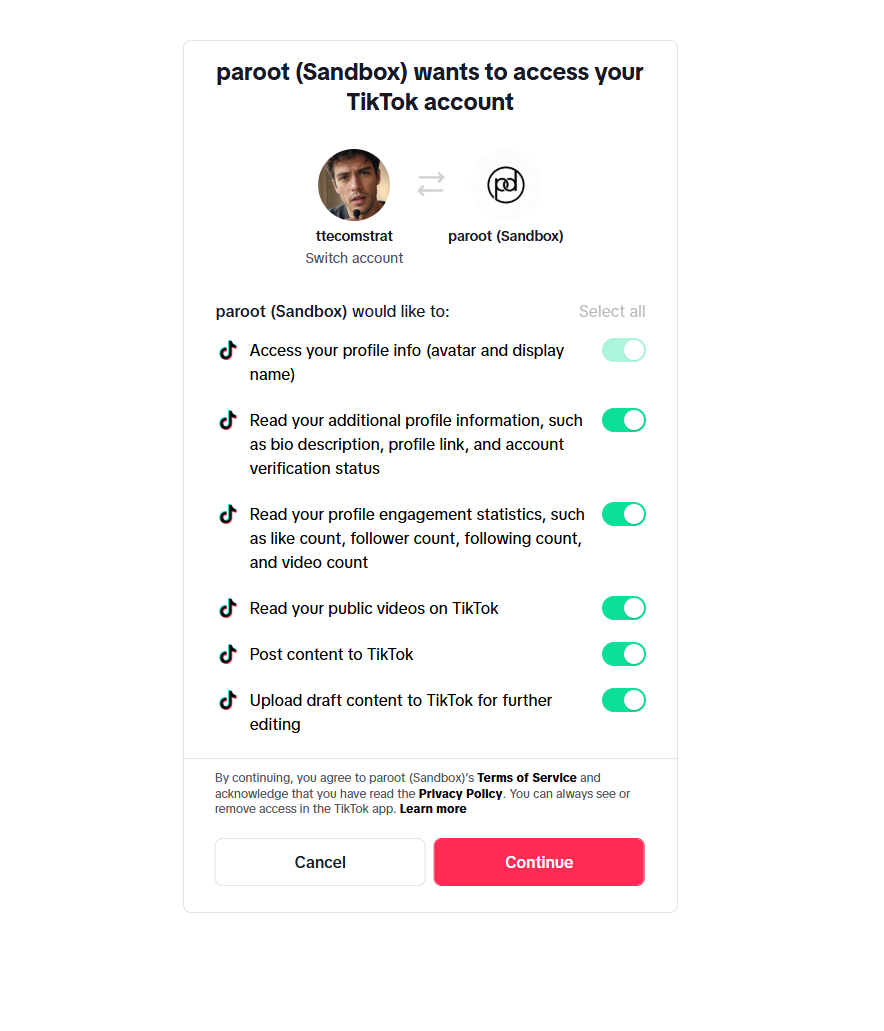
TikTok's official authorisation screen, listing the permissions Paroot requests for the connected account.
Step 1

Connect your TikTok account

You authorise Paroot through TikTok's official login screen, so we never see or ask for your TikTok password. TikTok shows you exactly what you are granting before you agree, and Paroot only ever accesses the accounts you choose to connect.
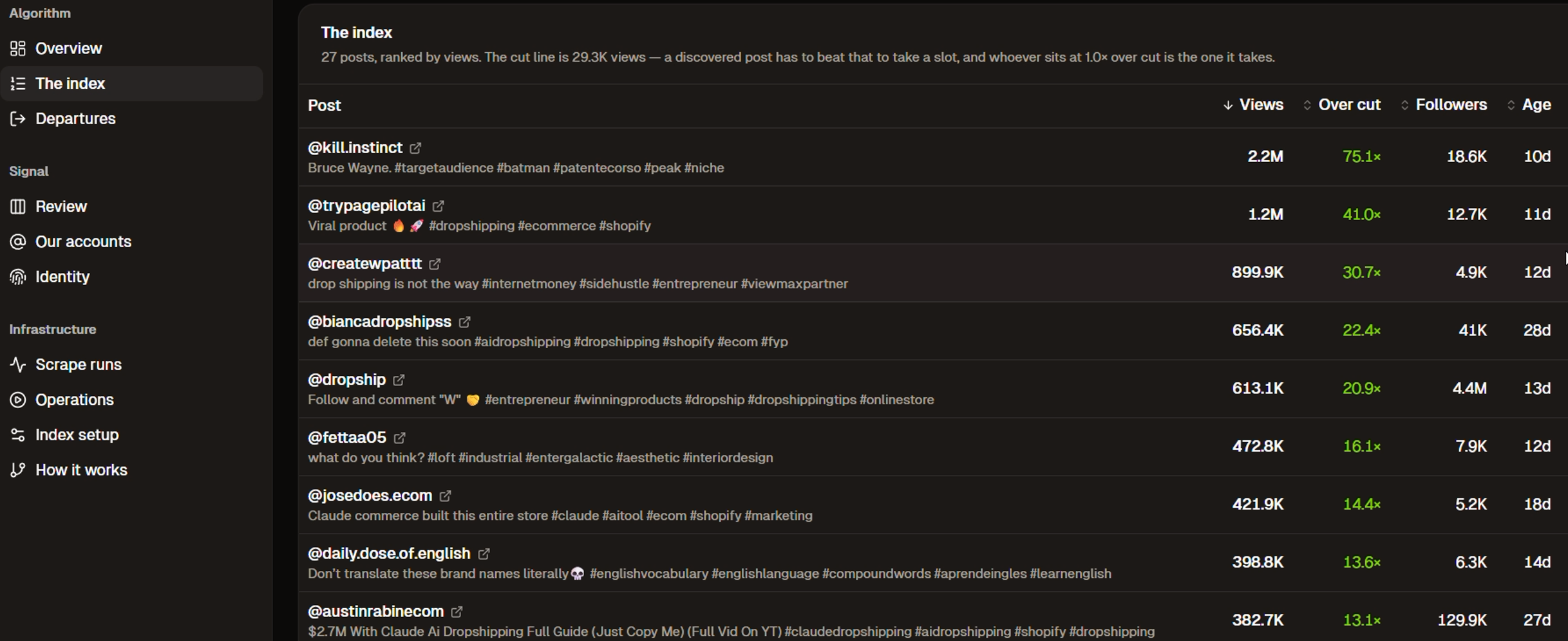
The Paroot index, listing posts ranked by views with how far each one cleared the cut line.
Step 2

See what’s breaking out

Paroot ranks your posts against your own baseline rather than against the whole of TikTok. A post that beats your usual reach shows up at the top with the multiple it cleared, its follower count and how old it is.

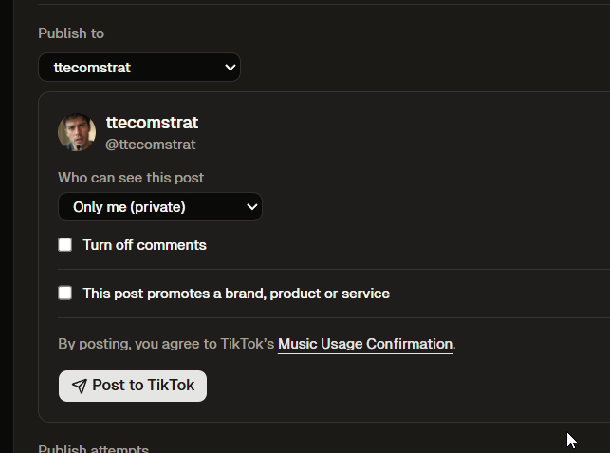
The Paroot publish panel, with an account picker, an audience setting and a Post to TikTok button.
Step 3

Draft the next one

Paroot drafts a post in the format that worked and shows it to you first. You review it, choose the account and the audience, then send it to TikTok — where you make any final edits and publish it yourself.

Features

Built around your own numbers

Every measurement Paroot makes is relative to the account it belongs to, so a 20,000-view post counts as a breakout for one creator and an ordinary day for another.

A cut line drawn from your own reach

Paroot works out the level your posts normally reach and draws a cut line there. Anything above it is ranked by how far it cleared, so you can see at a glance whether a post did twice your usual numbers or seventy times. Sort by views, by the multiple over the cut, by follower count or by age, and open any post on TikTok to watch it again.

  • Views, likes, comments and shares for every post you own
  • The multiple each post cleared your baseline by
  • Captions and hashtags kept alongside the numbers
The Paroot index, listing posts ranked by views with how far each one cleared the cut line.

A draft you approve before it goes anywhere

When Paroot has drafted a post you get the whole thing in front of you: the account it would go to, who would be able to see it, and the post itself. Nothing moves until you press the button. The draft then lands in your TikTok inbox, where you finish it in the TikTok app and publish it in your own time.

  • Pick which connected TikTok account the draft belongs to
  • Choose the audience, including keeping it private to you
  • Send to TikTok only when you press the button
The Paroot publish panel, with an account picker, an audience setting and a Post to TikTok button.

Format breakdown

Paroot describes what a breakout post actually did — the hook, the pacing, the structure — so the pattern is something you can reuse rather than guess at.

Several accounts at once

Connect more than one TikTok account and keep a separate baseline, a separate index and separate drafts for each of them.

Your voice, kept

Drafts are written to match how the account already sounds, so what you review reads like your own posts rather than a template.

Tracked over time

Posts are re-measured as they age, so a slow climber is not missed and your baseline stays current as the account grows.

Permissions

What Paroot accesses

Paroot asks TikTok for as little as it can and tells you plainly what that is. Here is the whole list.

Your profile and follower stats

Your display name, username, avatar and profile link, plus your follower count, following count, total likes and video count. Read-only.

Your own posts and their counts

The posts on the TikTok accounts you connect, with their view, like, comment and share counts, titles, thumbnails and publish dates. Read-only.

Drafts, only when you click

A draft is sent to your TikTok inbox when you press the button in Paroot, and not before. You then open TikTok, review it, edit it and publish it yourself.

Nothing is published without you

Paroot never publishes to your profile. It does not read your direct messages, does not touch accounts you have not connected, and never interacts with anyone else from your account.

Your password is never involved

Connecting runs through TikTok's official login, so Paroot never sees your TikTok password. Access tokens are encrypted before they are stored and are never sent to your browser.

Disconnect at any time

Disconnect an account from your dashboard and the stored tokens are deleted immediately. You can also revoke access from TikTok, under Settings and privacy → Security and permissions → Manage app permissions.

The full detail is in our Privacy Policy.

FAQ

Questions people ask first

Most of them are about what Paroot is allowed to do with a connected TikTok account, so those come first.

Does Paroot post to TikTok for me?
No. Paroot writes a draft and shows it to you in the dashboard. When you press the button, the draft is sent to your TikTok inbox. You then open the TikTok app, review it, make any edits and publish it yourself. Paroot never publishes to your profile.
What does Paroot read from my TikTok account?
Your profile details, your follower and account statistics, and the posts on the accounts you connect together with their view, like, comment and share counts. All of it is read-only, and all of it is used to show you how your own posts are performing.
Do I have to give Paroot my TikTok password?
No. Connecting runs through TikTok's own login screen. You sign in with TikTok, TikTok lists what is being granted, and you approve it there. Paroot never sees your password.
How does Paroot decide that a post broke out?
It compares each post against your own baseline rather than against the whole of TikTok. Paroot works out the reach your posts normally get, draws a cut line there, and ranks anything above it by how far it cleared. That way a breakout means a breakout for your account, at your size.
Can I disconnect a TikTok account?
Yes, at any time from your dashboard. Disconnecting deletes the stored access tokens straight away and Paroot stops retrieving anything further from that account. You can also revoke access from inside TikTok, under Settings and privacy → Security and permissions → Manage app permissions.

See it against your own TikTok numbers

Create an account, connect a TikTok profile through TikTok's official login, and Paroot will show you which of your posts cleared your own baseline.